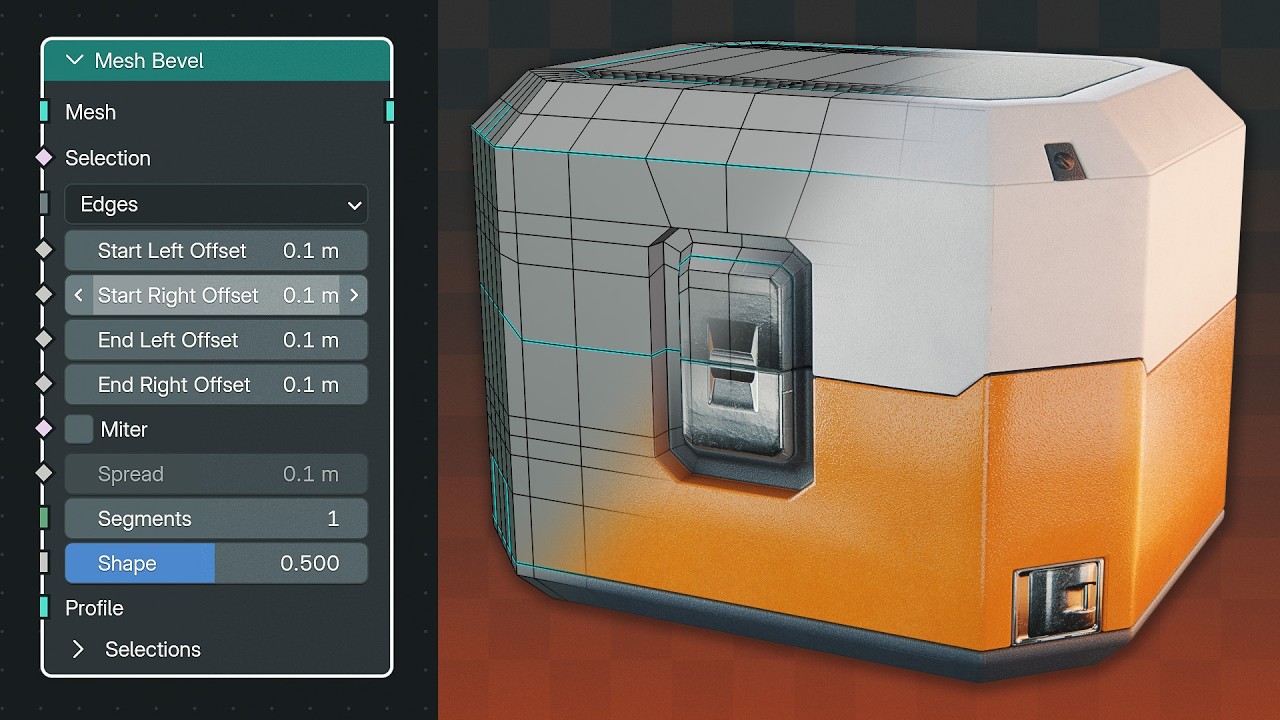
Blender 5.2 Just Made Bevels Better
? Free Blender Tools & Assets ?
?️ MoGraph Toolbox (Free Tools)
https://superhivemarket.com/products/blender-mograph-toolbox
? Stop-Mo (Free Stop Motion Addon)
https://superhivemarket.com/products/stop-mo
? Pixel Kit (Free Pixel Art Addon)
https://superhivemarket.com/products/blender-pixel-kit
⚡ Dynamic VFX Pack (Free Sample Pack)
https://blendermarket.com/products/blender-dynamic-vfx---elemental-asset-pack?ref=434
? Crafty Asset Pack (Free Sample Pack)
https://blendermarket.com/products/crafty-asset-pack?ref=434
❤️ Support the Channel
Patreon
https://www.patreon.com/southernshotty
Skillshare
https://www.skillshare.com/r/user/southernshotty
────────────────────────────────────────
? Tag me in your artwork!
Instagram: https://www.instagram.com/southernshotty/
X (Twitter): https://twitter.com/SouthernShotty
@SouthernShotty
────────────────────────────────────────
Blender 5.2 introduces a brand-new Mesh Bevel Node for Geometry Nodes, making it possible to build fully procedural hard surface workflows that previously required long modifier stacks. In this tutorial, I'll show you how the new node works, explain its settings, and build a procedural sci-fi panel system that can be applied to almost any model.
If you create game assets, hard surface props, or procedural modeling tools, this is one of the most exciting Geometry Nodes additions in Blender 5.2.
• How to use the new Mesh Bevel Node
• Understanding bevel amount, segments, profiles, and miter settings
• Outputting bevel selections for masks and shaders
• Creating procedural hard surface panel cuts
• Building an entire panel system inside Geometry Nodes
• Using sharp edges to drive procedural details
• Recreating traditional modifier stacks procedurally
• Cleaning up bevels with Merge by Distance
• Limiting bevels using edge angles
• Creating reusable Geometry Node assets
Why This Matters
Until now, creating procedural panel cuts usually meant stacking multiple modifiers together and manually tweaking each one. The new Mesh Bevel Node allows these workflows to live entirely inside Geometry Nodes, making them easier to reuse, customize, and apply to different models.
Whether you're building sci-fi assets, mechanical props, or non-destructive modeling tools, this node opens up much cleaner procedural workflows.
Chapters
00:00 – New Geometry Nodes Feature
00:30 – Mesh Bevel Basics
02:20 – Building the System
05:05 – Creating Panel Cuts
09:54 – Finishing the Setup
13:12 – Final Result
?️ MoGraph Toolbox (Free Tools)
https://superhivemarket.com/products/blender-mograph-toolbox
? Stop-Mo (Free Stop Motion Addon)
https://superhivemarket.com/products/stop-mo
? Pixel Kit (Free Pixel Art Addon)
https://superhivemarket.com/products/blender-pixel-kit
⚡ Dynamic VFX Pack (Free Sample Pack)
https://blendermarket.com/products/blender-dynamic-vfx---elemental-asset-pack?ref=434
? Crafty Asset Pack (Free Sample Pack)
https://blendermarket.com/products/crafty-asset-pack?ref=434
❤️ Support the Channel
Patreon
https://www.patreon.com/southernshotty
Skillshare
https://www.skillshare.com/r/user/southernshotty
────────────────────────────────────────
? Tag me in your artwork!
Instagram: https://www.instagram.com/southernshotty/
X (Twitter): https://twitter.com/SouthernShotty
@SouthernShotty
────────────────────────────────────────
Blender 5.2 introduces a brand-new Mesh Bevel Node for Geometry Nodes, making it possible to build fully procedural hard surface workflows that previously required long modifier stacks. In this tutorial, I'll show you how the new node works, explain its settings, and build a procedural sci-fi panel system that can be applied to almost any model.
If you create game assets, hard surface props, or procedural modeling tools, this is one of the most exciting Geometry Nodes additions in Blender 5.2.
• How to use the new Mesh Bevel Node
• Understanding bevel amount, segments, profiles, and miter settings
• Outputting bevel selections for masks and shaders
• Creating procedural hard surface panel cuts
• Building an entire panel system inside Geometry Nodes
• Using sharp edges to drive procedural details
• Recreating traditional modifier stacks procedurally
• Cleaning up bevels with Merge by Distance
• Limiting bevels using edge angles
• Creating reusable Geometry Node assets
Why This Matters
Until now, creating procedural panel cuts usually meant stacking multiple modifiers together and manually tweaking each one. The new Mesh Bevel Node allows these workflows to live entirely inside Geometry Nodes, making them easier to reuse, customize, and apply to different models.
Whether you're building sci-fi assets, mechanical props, or non-destructive modeling tools, this node opens up much cleaner procedural workflows.
Chapters
00:00 – New Geometry Nodes Feature
00:30 – Mesh Bevel Basics
02:20 – Building the System
05:05 – Creating Panel Cuts
09:54 – Finishing the Setup
13:12 – Final Result

SouthernShotty
Learn all things Blender 3D with a focus on characters, animation, rigging, and motion graphics!...