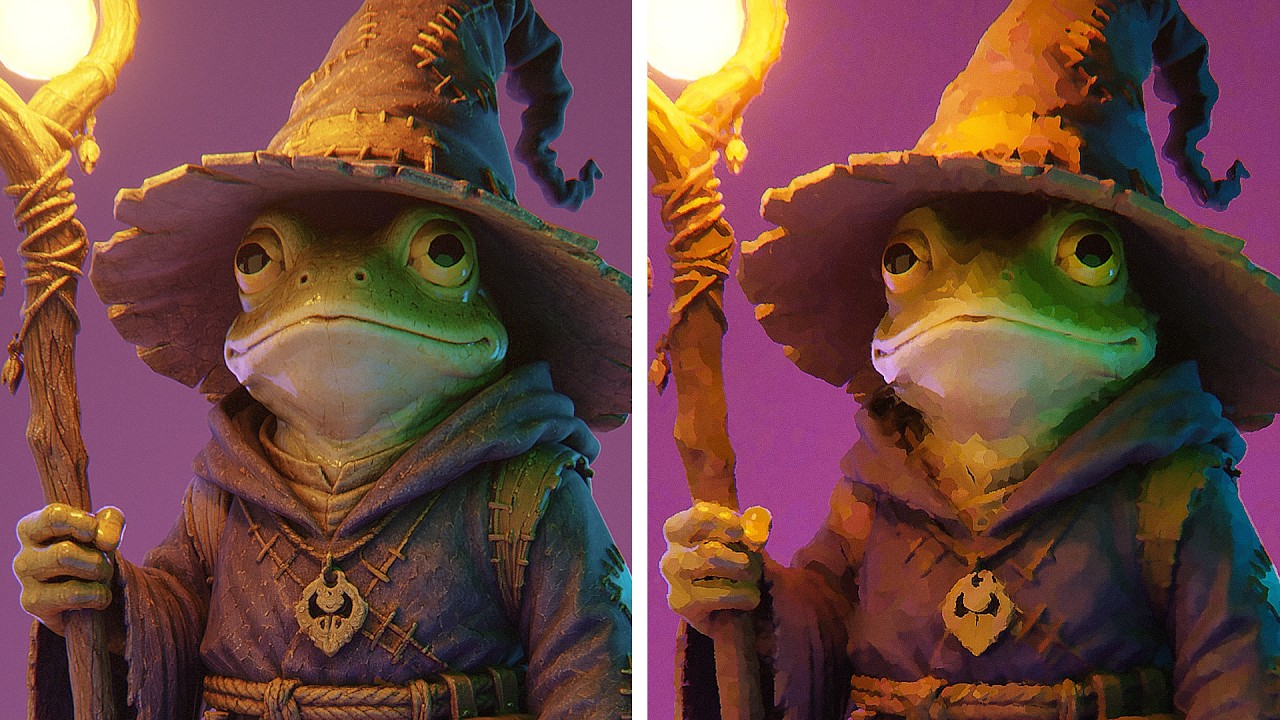
This Material Makes Any Texture Painterly
? Free Blender Tools & Assets ?
?️ MoGraph Toolbox (Free Tools)
https://superhivemarket.com/products/blender-mograph-toolbox
? Stop-Mo (Free Stop Motion Addon)
https://superhivemarket.com/products/stop-mo
? Pixel Kit (Free Pixel Art Addon)
https://superhivemarket.com/products/blender-pixel-kit
⚡ Dynamic VFX Pack (Free Sample Pack)
https://blendermarket.com/products/blender-dynamic-vfx---elemental-asset-pack?ref=434
? Crafty Asset Pack (Free Sample Pack)
https://blendermarket.com/products/crafty-asset-pack?ref=434
❤️ Support the Channel
Patreon
https://www.patreon.com/southernshotty
Skillshare
https://www.skillshare.com/r/user/southernshotty
Painterly Tutorial: https://youtu.be/9mQMGIa96wg
Paint Shader: https://www.youtube.com/watch?v=UfSw6428bcc&list=PLNVNj1ot-jUABacDIUEcJpNscELzjYDhm
────────────────────────────────────────
? Tag me in your artwork!
Instagram: https://www.instagram.com/southernshotty/
X (Twitter): https://twitter.com/SouthernShotty
@SouthernShotty
────────────────────────────────────────
Turn almost any image texture into a stylized, painterly material directly inside Blender's Shader Editor. In this tutorial, I'll show you how to build a lightweight procedural filter that simplifies fine texture detail while preserving larger shapes and colors.
The effect is inspired by Blender's Kuwahara-style filtering, but instead of applying the effect after your render in the Compositor, we're building the stylization directly into the material itself. That means your textures can already have a painted look before you add lighting, compositing, or other NPR effects.
We'll build the entire system from scratch and break down how it samples surrounding pixels, finds smoother regions, and uses those colors to create larger, painterly shapes. We'll also turn the setup into a reusable node group with a simple intensity control.
This works especially well for stylized environments, painterly 3D scenes, NPR rendering, illustrations, and projects where realistic image textures feel too detailed or photographic.
Chapters
00:00 – The Idea
00:30 – How the Effect Works
02:04 – Building the Filter
11:42 – The Next Layer
17:23 – Bringing It Together
24:02 – Final Setup
CC0 Texture: https://cc0-textures.com/t/th-cobblestone-floor-04
?️ MoGraph Toolbox (Free Tools)
https://superhivemarket.com/products/blender-mograph-toolbox
? Stop-Mo (Free Stop Motion Addon)
https://superhivemarket.com/products/stop-mo
? Pixel Kit (Free Pixel Art Addon)
https://superhivemarket.com/products/blender-pixel-kit
⚡ Dynamic VFX Pack (Free Sample Pack)
https://blendermarket.com/products/blender-dynamic-vfx---elemental-asset-pack?ref=434
? Crafty Asset Pack (Free Sample Pack)
https://blendermarket.com/products/crafty-asset-pack?ref=434
❤️ Support the Channel
Patreon
https://www.patreon.com/southernshotty
Skillshare
https://www.skillshare.com/r/user/southernshotty
Painterly Tutorial: https://youtu.be/9mQMGIa96wg
Paint Shader: https://www.youtube.com/watch?v=UfSw6428bcc&list=PLNVNj1ot-jUABacDIUEcJpNscELzjYDhm
────────────────────────────────────────
? Tag me in your artwork!
Instagram: https://www.instagram.com/southernshotty/
X (Twitter): https://twitter.com/SouthernShotty
@SouthernShotty
────────────────────────────────────────
Turn almost any image texture into a stylized, painterly material directly inside Blender's Shader Editor. In this tutorial, I'll show you how to build a lightweight procedural filter that simplifies fine texture detail while preserving larger shapes and colors.
The effect is inspired by Blender's Kuwahara-style filtering, but instead of applying the effect after your render in the Compositor, we're building the stylization directly into the material itself. That means your textures can already have a painted look before you add lighting, compositing, or other NPR effects.
We'll build the entire system from scratch and break down how it samples surrounding pixels, finds smoother regions, and uses those colors to create larger, painterly shapes. We'll also turn the setup into a reusable node group with a simple intensity control.
This works especially well for stylized environments, painterly 3D scenes, NPR rendering, illustrations, and projects where realistic image textures feel too detailed or photographic.
Chapters
00:00 – The Idea
00:30 – How the Effect Works
02:04 – Building the Filter
11:42 – The Next Layer
17:23 – Bringing It Together
24:02 – Final Setup
CC0 Texture: https://cc0-textures.com/t/th-cobblestone-floor-04

SouthernShotty
Learn all things Blender 3D with a focus on characters, animation, rigging, and motion graphics!...